Frequently Asked Questions (FAQ) Of Technics SL-1200Mk2/SL-1210Mk2 Turntables.
This is for informational purposes only, DJ Depot is not responsible for any content included herein.
( [Almost] Everything you ever wanted to know about your 1200 )
Revision 2.2 - January 18, 1994 Copyright (C) 1993,1994 Steve Valdez
HTML Markup by Steve Waits
New in 2.3:
- minor revisions and information additions... (marked with a ##)
- Cartridge spec list
comments & submissions welcome, corrections wanted.
IMPORTANT: Use this information at your own discretion -- if you screw up your turntables it isn't my fault. Treat this FAQ as being purely anecdotal - I won't guarantee accuracy. If you go ahead though, be sure you have a solid idea of what you are about to do and observe all electrical precautions where pertinent. You should have some electronics experience if you open up your deck.
Initially this was going to be only a tweaker FAQ but there isn't that much more general stuff so I put it in anyways. This info checks out on Technics SL-1200Mk2 and SL-1210Mk2 turntables. I haven't looked at SL-1200Mk3 turntables which are supposed to have improved electronics over a standard Mk2. The physical stuff will be the same though. Also, the electrical information applies to the Technics SP-25's (they use the same drive electronics/motor). SP-25's are broadcast turntables FYI. This is all pretty easy stuff but if you need a more detailed explanation ask for help.
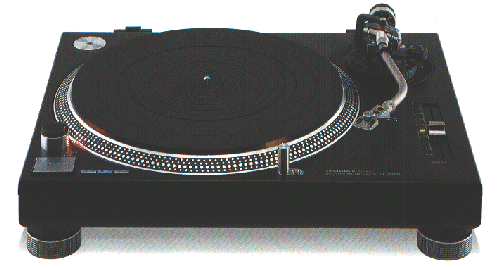
I've given up on the tonearm disassembly - I've done it but you need pictures to describe how to take it apart/put it back together. This also includes replacing the locking clip and calibrating the anti-skate knob as both require extensive disassembly. If I'm in a good mood I may try to describe the process in the future.
Table of Contents:
- 1.0 - 1200 history
- 2.0 - Tonearms & Cartridges
- 2.1 - Balancing your tonearm
- 2.2 - Other tonearm/cartridge stuff U may wanna know
- 2.3 - Picking a cartridge
- 2.4 - Slipmats
- 3.0 - Disassembly of your 1200
- 3.1 - Removing the top
- 3.2 - Removing the rubber bottom
- 4.0 - Advanced Tonearm & Headshell adjustments
- 4.1 - Tightening the tonearm suspension
- 4.2 - Tightening the headshell locking ring
- 5.0 - Pitch Controls
- 5.1 - Adjusting the pitch gain (i.e. more than +-8%)
- 5.2 - Adjusting the slider for true 0 at center
- 6.0 - Other Hacks, Adjustments & Fixes
- 6.1 - Adjusting the braking
- 6.2 - Eliminating the annoying ground wire
- 6.3 - Replacing the pop-up lights
- 6.4 - Fixing the power switch when the top comes off
1.0 - 1200 history
Sometime in the early 70's Technics released the original SL-1200 as a hi-fi turntable. Then sometime around 1978-79 they did some work improving the motor, redesigning the casing, adding a separate ground wire, etc. and released the SL-1200Mark2. This is what the majority of DJ's have and this design still endures today. The SL-1200Mk2 is the only version officially authorized for sale in the U.S. by Technics. The following derivatives are available on the gray market in the U.S. and are international versions (110/220V). The SL-1210Mk2 is essentially the 1200Mk2 except in black. Everything else is the same(## word has it that the 1210 is lighter than the 1200 and is more susceptible to rumble, etc.). (## To confirm that the 1200 and 1210 Mk2's are the same electronically speaking, the service manuals are identical for either model.) The SL-1200Mk3 is also in black but is supposed to have a better motor and other improvements.
The best price on a US version 1200 is from ProSound & Stage mentioned above in the L.A. area. They sell them for $399. There are a bunch of places in the L.A. area and in N.Y. which sell (likely international versions) 1200's and 1210's for around $367. In the LA area, try Quality Electronics on Santa Monica Blvd. (Hollywood?) or Astro Sound somewhere in the valley. Get a hold of the L.A. Recycler for phone #'s... The 1200Mk3 goes for $499 at ProSound & Stage. These stores probably offer their own warranties as Technics/Matsushita will not do any kind of warranty work on non-US models.
If you want to find out what region of the world your deck was destined for look at the SERIAL NUMBER label. This is not the black label on the back. Some of you don't have this info printed next to your serial # so you'll be out of luck. Next to the serial number is the model number: "SL-1200MK2-MC" The "MC" part tells you where it was destined for:
- M - USA
- MC - Canada
- E - Scandinavia/Switz.
- EK - UK
- XL - Australia
- EG - Germany
- EB - Belgium
- EH - Holland
- EF - France
- Ei - Italy
- XA - The rest of the world (I think they also use XG here)
There are also a few other codes not worth mentioning. An easy way to tell if it is NOT a US version is to look for the 110/220V switch under the platter. The other giveaway is a Euro-plug with a US-adapter.
2.0 Tonearms & Cartridges
2.1 Balancing your tonearm
I've seen many differing methods for doing this so I've included descriptions from others on the ways they do it:
Method #1:
The way I do it with Stanton 500AL's: mount the cartridge in the headshell pulled almost all the way to the front. Make sure it looks straight in relation to the headshell when you put it down on the record - readjust as necessary. Put the height ring at 2.5mm. For most purposes I reverse the weight on the tonearm, push it all the way forward and set the anti-skate to the max. If you try scratching and the needle jumps back a lot turn it down in 1/2-gram increments as necessary. Pete Ashdown's method below is the same way I set it up for listening to my collection. Except I put the weight at about 2.25 grams. No coins on either setup. You should really look at your technique if it skips no matter what you do. I reserve coins for really bad situations like springy floors. Some may not like the reversal of the weight but unfortunately, the 500AL's need at least about 3 grams for scratching, and calibrating it the way you are supposed to get's you at most about 2.5 grams.
Method #2:
Written by Pete Ashdown
This is what I ended up with on Stanton 680 cartridges.
Use the included weight that comes with the Technics head shells. Put a record on so you don't damage the needle, then swing it out over the record. Adjust the weight until it "floats" level above the record. Turn the weight indicator to "0". Now adjust the height until it is close to the surface of the record. This was 1.5 for me. Adjust the weight to 1.5 for just home listening, 3.5 for practicing and performance. Use an unpressed side of a 12" or a 12" with a large run- off to set the anti-skate. Put the needle on unpressed vinyl and adjust the skate (while spinning) so it stands still. On 1.5, it should be about 1.3. On 3.5, you can't adjust it high enough, so just crank it to the max.
After much discussion on the bpm mailing list, the consensus on anti-skate settings is to set it at 0 if you scratch mix or at a number equal to the weight on the cartridge if you just listen to your records without touching them... The idea is that the anti-skate mechanism in the turntable is designed for normal record playing. A side note: several of the 1200's I have worked on do not have the anti-skate knob properly calibrated much like two decks with two different speeds at a scale setting of +1%.
If anyone else has successful balancing techniques that differ significantly from what has been already described get in contact with me.
2.2 - Other tonearm/cartridge anecdotes
It's supposed to be a DJ's secret that angling the cartridge inwards a few degrees (5-15) helps keep the needle in the groove when scratching. I haven't tried this but if you do be forewarned that this may wear out your records faster. It would probably be a bad idea to try this with non-spherical styli as well.
I saw FM20 (QBert et.al. and crew - 1992 DMC champs) perform here and I noticed that they had their tonearm heights maxed out and were not using any Stanton carts (xcept for one deck with a 500AL when they replaced a headshell). There are supposed to be Shure carts perfect for scratching -- I don't know which ones. Some people set their height rings to 0 though.
A more accurate way of aligning your cartridge in the headshell is with a GeoDisc from Mobile Field Sound Labs (?? - they press up those gold CD's nowadays) probably hard to find but I have one at work.
Some say that the headshells on the 1210's vibrate more than those on the 1200's but on the 1210 I had for a while it wasn't any different from the 1200's. My guess is that the adjustments were done less critically on the 1210's since they aren't 'officially' offered for sale in North America and much of Europe. Read below if yours does.
2.3 - Which cartridge to get?
- Stanton 500AL's are cheapest, decent, and can take a lot of abuse. You can run down to Radio Shack and get one in an emergency if necessary. Be careful not to buy the broadcast versions - make sure the needle is in WHITE plastic - NOT dark blue. If you get stuck with a blue one you can buy a replacement styli and replace the blue one. The model to look for is D5107A. This is the same one RS sells. You can also replace the styli with the D5107E which gives you the elliptical stylus.
- Stanton 500EL's are rugged, have a better freq.response over the straight AL's (due to the elliptical styli) and still relatively cheap. Basically the same cartridge body as the AL xcept with the D5107E styli.
- Stanton 680EL's are popular with a lot of people for the elliptical needle (to help keep the needle in the groove) and for the slightly better response over the 500's. The 680AL has the spherical styli on it me thinks.
- There's the new Stanton 890 which costs a lot but which has the 20-20k response. I haven't seen anyone using these...they probably behave the same as 680's from what I gather. Ortofon's (in general) look sharp and sound a lot better than Stanton's but are hard to find, expensive, and you can't put coins on the
- Concorde Pro (xcept maybe if you have Danish coins...). You can't beat the ease of installation with a C-Pro though.
- There is a Shure line but as mentioned above I'm not familiar with them at all. (someone needs to fill me in...)
The general feeling I've gotten from bpm and others I've talked with is to get 500's if you are a scratching DJ, 680's for normal club mixing, Ortofon's also for club-use with a much better sound.
Vital Specs List:
******************************************************************* Model(price) TrackForce Stylus FreqRange Separation ****************************************************************** STANTON 500AL 2-5 gm spheri. 20-17kHz 28db 500EL 2-5 gm ellipt. 20-18kHz 30db 680AL 2-5 gm spheri. 20-18kHz 28db 680EL 2-5 gm ellipt. 20-18kHz 30db 890AL 2-7 gm spheri. 20-20kHz 30db ORTOFON C-Pro C-Pro N/C Concorde SHURE
I have the specs for all the Stanton stuff, if anyone needs more specific information other than what is listed get in contact with me. People with specs on the Ortofon's and Shures's PLEASE get the info to me!
2.4 - Slipmats
Most people have found the 'wonka' slipmats to be the best. Sorry, I don't have a source with me. Avoid slipmats which are printed/silk-screened - they wear off and look bad pretty fast. This includes those "Technics" slipmats made in Belgium. Either try getting dyed ones or make your own. Some suggestions to try: felt from the fabric store, an old record in it's plastic sleeve, thin foam packing sheets (Like the stuff your 1200 was packed in). Use a piece of paper to tighten up center holes which are too loose. (put a small piece of paper on top of the spindle and put the record on top)
3.0 - Disassembly of your 1200
What you'll need for the mods (read text for detail):
- #1 Philips screwdriver
- jewelers philips screwdrivers
- power driver
- multimeter
- soldering iron + solder
- wire
- wire stripper/cutter
- electrical tape or that heat-shrink stuff
3.1 - Removing the top ( for access to the circuit board )
- unplug the TT, remove the platter, secure the tonearm.
- use a Philips screwdriver to remove the 5 screws holding the plastic cover under the platter.
3.2 - Removing the rubber base ( access to tonearm, cue light, power switch, basically everything else. )
- unplug the TT, remove the platter, secure the tonearm.
- There are a few ways of doing this. You can use the hard plastic dust cover that came with your TT or you can find a rectangular milk crate. Or if you have a coffin (or similar case) you could turn it 90degrees to the way you normally put it in. Turn the deck upside down. If you use a crate you may want to tape it in place to keep it from falling in. Be careful with the tonearm.
- remove the feet by unscrewing them.
- Use a power driver (or regular screwdriver) to remove all 21 screws holding the rubber base.
- Be careful with the cables as you pull off the base.
- Remember: the 4 long screws go under the feet, the short screws with large washers go in the center circle, and the metal screws (medium length) go along the edges.
4.0 - Advanced Tonearm & Headshell stuff
4.1 - Tightening the suspension on your tonearm
Some TT's have tonearms which seem to be loose. If you grab the tonearm and pull it gently back and forth and it seems loose you can tighten it. It shouldn't move at all. A loose suspension can severely affect it's performance - from jumping needles to binding.
It's pretty easy to tighten the suspension. You'll need a small flat screwdriver and a large one. Use the large one to loosen the outer locking screw on the top of the pivot point. Now use the smaller screwdriver to loosen up the smaller screw. Put a drop of oil where the bearings are (under that top support on the other end of the adjustment screw) so that it doesn't bind. Now tighten the small screw slowly until it just contacts the bearings. Adjust the tightness so the tonearm doesn't wiggle if you pull on it but leave it loose enough for the tonearm to pivot freely without binding. Adjust carefully and don't overtighten otherwise the bearings will be damaged! When done, tighten up the locking screw.
4.2 - Tightening up the headshell locking ring
Have you put on your headshell, twisted that knurled tightener at the end of the tonearm as tight as possible and have found that the headshell still moves around? What will happen is that the headshell won't sit parallel to the record but may be tilted as a result of twisting of the headshell. This usually occurs when you change headshells a lot or if you've had your turntable for a while, and can contribute to needle jumping so here's what you do to fix it.
First read 3.2 on base disassembly. Remove the rubber base. There will be this big piece of hard black plastic covering almost everything. You'll need to remove it. To remove the tonearm assembly look for three screws (all formerly under that black plastic) and unscrew them. Be careful not to drop the tonearm when you remove that last screw!
Now, remove the tonearm assembly from the rest of the 1200, and look at the bottom of the tonearm where the headshell is put in. There will be two tiny philips screws there. Get a jewelers screwdriver of the CORRECT size and tighten those up. Put the headshell on and try wiggling it to make sure everything is right. Now put your tonearm back on and close everything back up.
5.0 - Pitch Controls
IMPORTANT: Make sure you have the pitch slider set at the center (0%) if you make any of the two following adjustments.
Also, the pitch gain on one 1200 is not necessarily the same on another 1200. Or, a +6 according to the scale on the first 1200 is probably not the same speed as a +6 according to the scale on the other.
5.1 - Adjustment of pitch gain
Some have said that you can get +-15% pitch gain by doing this but on the decks that I have tried this on it doesn't get up that high. One consideration if you try this is that it gets harder to zero in on the exact speed when mixing beats.
Remove the top panel under the platter as described above. Look at the upper right hand corner of the PCB (printed circuit board). There will be a colored pot up there (blue) which sez "pitch" next to it. Use a multimeter on the pot to get a reference before turning it if you want to get back to where you started from. (test for resistance, one clip to the lead facing the back, the other on the lead to the right) Turning to the right should increase the gain (greater than +-8%) and vice versa. The pot is a little touchy when it comes to precision adjustment. There's a way to get it into factory spec with a frequency counter but I don't remember how at the moment.
5.2 - Adjusting the pitch slider to 0% at center
Contrary to (popular?) belief there is no way to lose true 0% pitch when the slider is in the middle - no matter how you hack it. When in the middle there is a switch which is thrown which bypasses the pitch slider and the motor is now crystal locked at the exact speed. But, if your deck is messed up in this area when you move the slider in the + direction, for example, it will slow down at first and will then move to 0 and then will speed up as you move it more in the + direction! In other words you now have 0 at two places. So this is for reference if you need to get your pitch slider so that 0 is really in the center. Open up the base, look where the pitch pot is. There will be a hole about 3-5mm in diameter where you can see a small pot on the other side. Hook up a multimeter to that pot (again, connect to the center lead and the one nearest the edge of the board I think) and use a small adjustment screwdriver to adjust it to 2.7kOhm.
6.0 - Other Hacks / Fixes
6.1 - Adjustment of braking
Doing this you can get your decks to brake hard enuff to make it spin backwards when you hit STOP. Most decks have this set correctly but if yours isn't then you can do this. Pop open the top as described, and look for pot VR201 - It's on the right side next to the blue pitch pot described above and says "brake" next to it. Turn it to the right to increase the braking time. I suggest you just nudge it a little to the right and see what happens by placing the platter back on and playing with the start/stop button. Make sure you unplug the turntable from the wall before taking off the platter again. Note that it takes slightly more force to stop a platter w/record vs. an empty platter.
6.2 - Eliminating the ground wire
This may work only with certain setups -- to be sure: use a multimeter and do a continuity check between the ground screw on the back of your mixer/pre-amp/whatever and the outer conductor of the RCA jack inputs. Check both channels. Not all systems share a common ground. If it does, remove the rubber base from your TT. Remove the screws to the plastic stress clip for the cable coming out from under the tonearm. Dissasemble the clip. Remove the two screws holding down the round plate. Move it out of the way. Use two short lengths of wire and solder both to the ground tab the current wire is connected to. Solder the end of one wire to the shield of one channel in the audio cable where it is soldered to the PCB, and do the same for the other wire and channel. You can desolder and remove the old ground wire if you want. (I left mine on just in case) You may not want to do this mod if you are using different mixers constantly.
6.3 - Changing the pop-up lights
- remove the base as described above.
- remove the two screws holding the whole light fixture from beneath.
- Use a jewelers screwdriver ( with the rotating tops so you can apply pressure while turning ) to remove the small screw at the bottom of the metal cylinder where the bulb is. Make sure to get a correct size screwdriver as some decks have this really torqued in. (read below)
- If you are a DIYer it's a ~20VDC bulb. Be careful here or you may kill your turntable (12-14v bulbs won't work - they glow faintly when the cylinder is down and burn out too quickly - they sure are bright though) You'll need the right size too, some may need a slight modification to fit--use the soldering iron to burn off some of the glue at the base.
If you aren't a DIYer you'll want to read this:
From: Dario Alcocer
...As far as the replacement bulb was concerned, I played no games; I contacted an electronics shop in Oakland that's an authorized Panasonic/Matsushita dealer, and ordered _two_ lamps (just in case I messed up). I ordered them, and they arrived via UPS 3 days latter. I think the lamps were kind of pricey, around $4.95 each. By the way, If anyone needs it, I have a list of authorized dealers that I can e-mail or fax to you.
[EdNote: It's Cass Electronics in Oakland,CA and the part number is SFDN122-01 : "Lamp, stylus illuminator" ] - Using a small precision (jeweler's) screwdriver, remove the polished aluminium shell to expose the bulb.
[This is where you have to be a little careful and patient. Since the screw was torqued in pretty good from the factory, what I did was used a pair of pliers to turn the screwdriver, while pushing down firmly to keep it from stripping the screw head. Since the screw is pretty small (and easily stripped), MAKE SURE you have a screwdriver that fits the screw EXACTLY; even if you have to go 40 miles to a store to buy the right screwdriver, do it. After all, if you paid nearly $400 US to buy a 1200, don't cheat yourself by buying a cheap screwdriver that can damage it.]
- Remove the bulb from the lamp housing and clip it off from the two wires as close to lamp as possible. You'll want to leave enough wire left over, just in case the bulbs you get don't have long enough leads.
- Solder (or twist) the wires of the bulb to the corresponding wires coming from the turntable.
[Ed Note: Make sure you use electrical tape or shrink tubing on each wire when done!]
Insert the new bulb into the lamp housing and re-attach the polished aluminum shell.
Re-install the lamp unit into the turntable. Before you replace the bottom rubber base, test the pop-up switch to make sure that the bulb leads won't get caught. If there is too much spare wire, you'll either remove the excess or just tuck it out of the way.
Replace the bottom rubber base, and install the four rubber feet. Connect power cord, and make sure the light bulb lights and pops up cleanly.
This whole procedure should only take 10-15 minutes at the most. Best of all, if you have the right tools (precision screwdriver, regular Phillips screwdriver, and a set of pliers) it should be an easy thing to do.
6.4 - Fixing the power switch when the knob comes off
Have you ever lost the shaft -- when you happen to twist the black knob right off? If you turn your TT upside down it won't come back so you'll need to do this: remove the base as described above and look where the power switch is. Push the shaft back up and reattach the black knob. You may want to put a drop of glue in the knob center/bottom before replacing it to help prevent this. Or you could just tape down the knob and use a power strip to turn your TT on and off.